PSA Online Appointment 2026 – Complete Booking Guide
The PSA Online Appointment system is an essential online service that allows individuals to book appointments for civil registry documents such as birth certificates, marriage certificates, and more. In this article, you will learn everything about how the system works, how to book an appointment step-by-step, and important tips to avoid common mistakes. Whether you are a first-time user or just need a quick refresher, this guide will help you understand the entire PSA Online Appointment process in a simple and clear way.
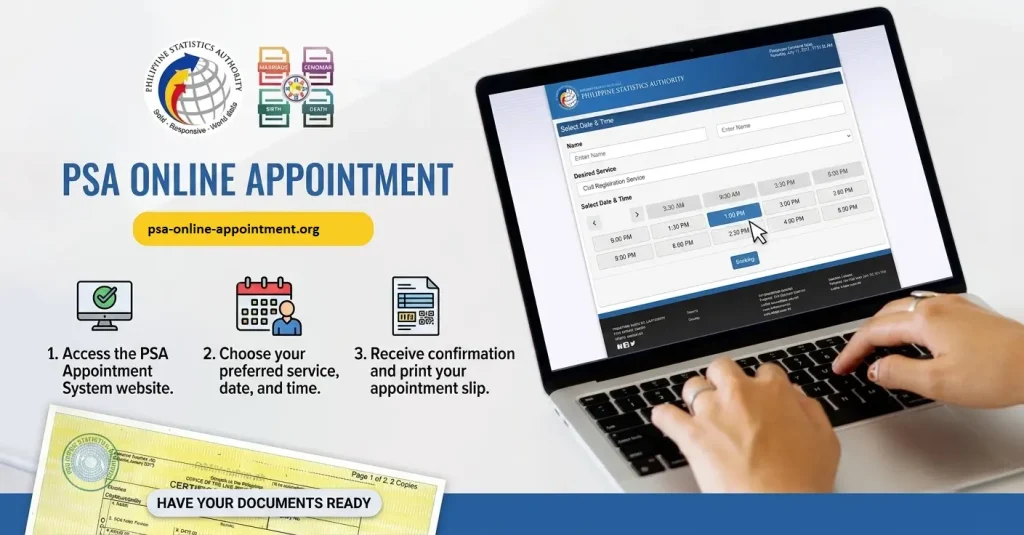
Step by step Booking Guide
How to Get a PSA Appointment Online: Step-by-Step Guide
Follow these simple steps to schedule an appointment through the PSA Civil Registry System Outlets. Click to get all PSA Application Form
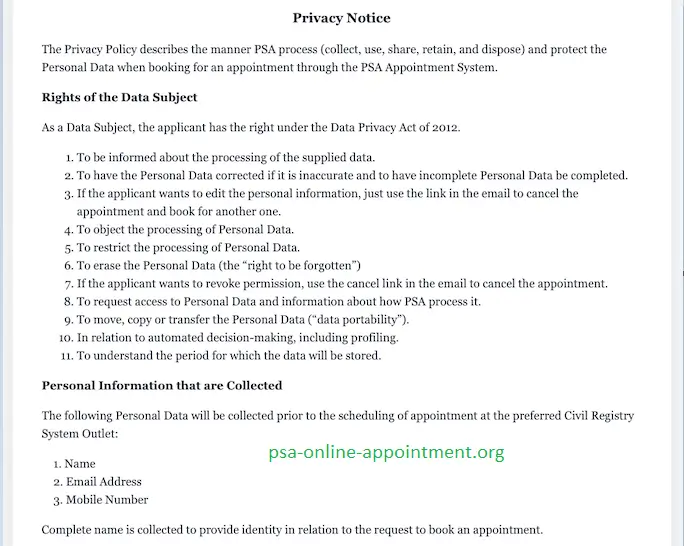
Step 1: Important Appointment Guidelines and Privacy Reminders
Carefully read and understand the appointment process, Privacy Notice, and all important reminders before proceeding with your application.
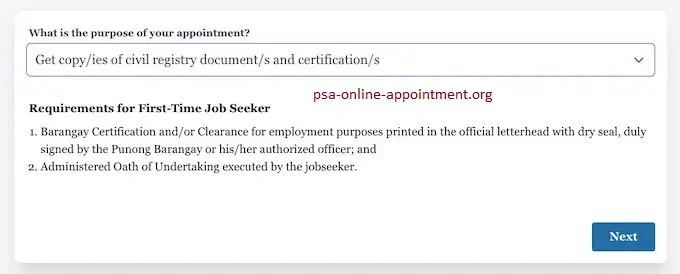
Step 2: Select Your Appointment Purpose and Correct PSA Outlet
Choose the purpose of your appointment. If you need to request a Court Decree or Legal Instrument, make sure to schedule your appointment at the PSA Civil Registry System Outlet located in East Avenue, Quezon City.
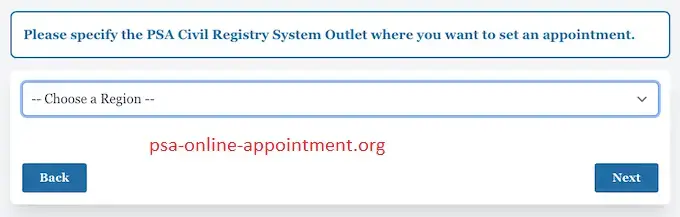
Step 3: Choose Your Preferred PSA CRS Outlet and Review the Reminders
Select your preferred PSA Civil Registry System Outlet for the appointment. Before continuing, review and understand the provided Important Reminders to avoid any issues during your visit.
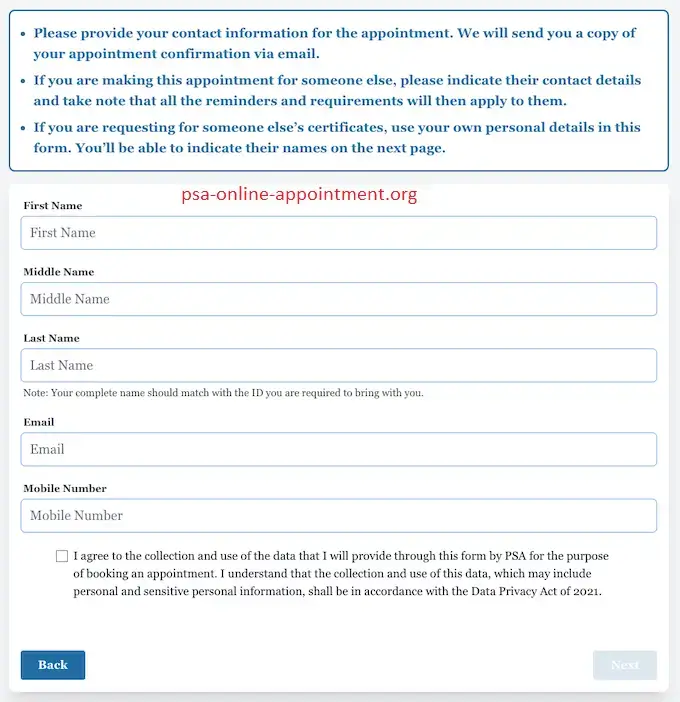
Step 4: Enter the Appointee or Requester’s Information
Enter the Appointee/Requester Information. This refers to the individual who will personally process the request at the PSA Civil Registry System Outlet. Provide your complete name, active email address, and mobile number. A One-Time-Pin will be sent to the registered email address for verification.
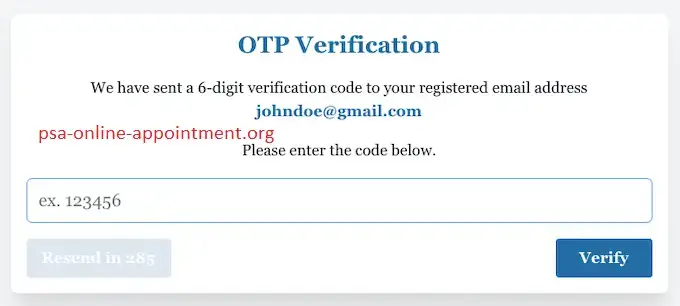
Step 5: Enter and Verify the One-Time PIN
Enter and verify the One-Time-Pin received through your email to continue with the appointment process.
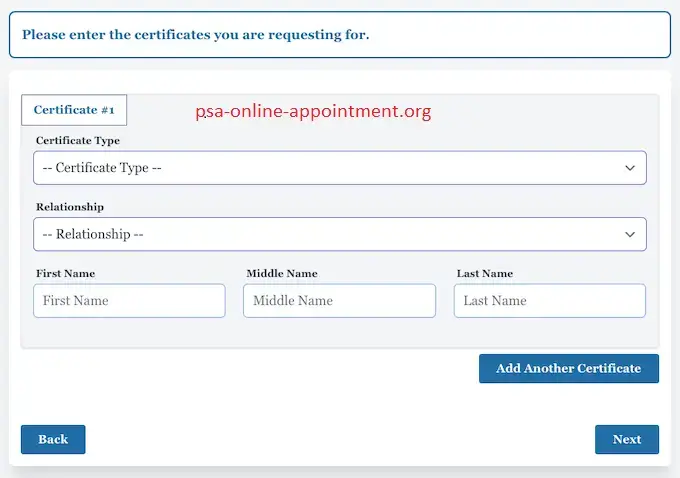
Step 6: Select the Document Type and Provide the Owner’s Details
Choose the type of civil registry document or certification you want to request. If you are applying on behalf of another person, provide the required relationship details and submit the necessary information about the document owner. Please note that an Authorized Representative can only submit up to two application requests.
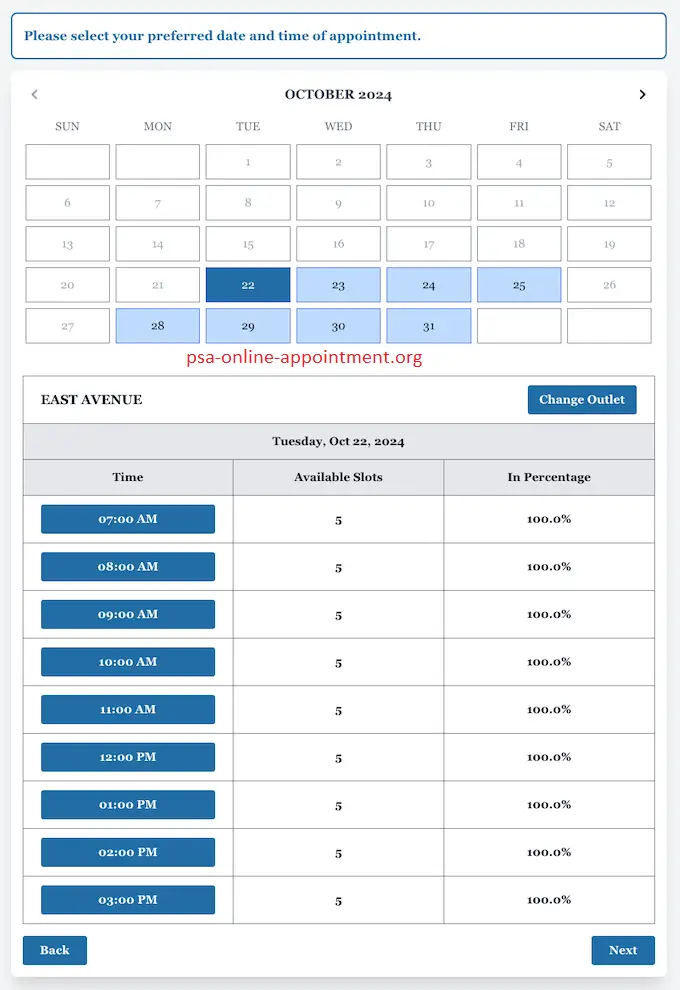
Step 7: Select Your Preferred Appointment Date and Time
Select your preferred appointment date and available time schedule based on the slots provided by the system.
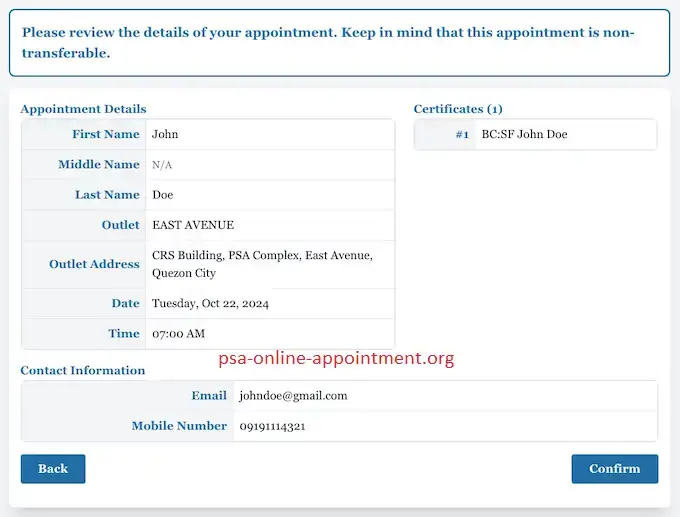
Step 8: Review, Confirm and Save Your Appointment Details
Carefully check all appointment details before confirming your request. Once completed, a copy of the appointment confirmation will be sent to the appointee’s registered email address. Bring this confirmation on the scheduled appointment date.
Step 9: Arrive Early and Prepare All Required Documents
Arrive at the PSA Civil Registry System Outlet a few minutes before your scheduled appointment time. Make sure you have all required documents ready, including properly completed Application Form/s, valid identification cards, and an Authorization Letter, Special Power of Attorney, or Affidavit (if applicable).
What Happens After You Successfully Book Your Appointment?
After completing your online appointment booking, you will receive a confirmation message containing all the necessary information required for a smooth and hassle-free visit to the PSA outlet.
Here are the important details you should expect:
Alpha-Numeric Reference Code:
Your appointment confirmation will include a unique alpha-numeric reference code assigned to your booking. Keep this code safe, as PSA staff may ask for it during the verification process when you arrive at the outlet.
QR Code:
A QR code will also be provided in your confirmation. Once scanned at the PSA branch, it allows the staff to quickly access your appointment information, helping make the check-in and validation process faster.
Appointment Details:
The confirmation slip will show complete appointment information, including your selected PSA outlet, scheduled date and time and the specific document(s) you requested during the online booking process.
Additional Instructions:
You may also find important reminders and instructions along with your appointment details. These may include the required documents to bring, applicable health and safety guidelines punctuality reminders, and the need to present a valid government-issued ID.
Always make sure to save a digital copy or print your appointment confirmation slip before your scheduled visit. You must bring this confirmation with you, as failure to present it may result in being denied entry at the PSA outlet.
If you do not receive your appointment confirmation through email or SMS after completing the booking, check your spam or junk mail folder first. If the confirmation is still unavailable, you may need to repeat the booking process or contact the PSA support team for further assistance.
Appointment Scheduling vs. Express Delivery
There are two convenient ways to obtain your official PSA certificates, depending on what works best for your needs.
Step-by-Step Guide to Ordering PSA Certificates Online Through PSA Delivery
Visit an Authorized PSA Certificate Online Service Provider
Start by accessing a trusted and authorized PSA certificate online service provider. Platforms such as PSAHelpline.ph are official partners of the Philippine Statistics Authority that help process and deliver PSA certificates conveniently across the Philippines.
Select the PSA Document You Want to Request
Choose the specific certificate you need from the available options. You can request important documents such as a PSA birth certificate, PSA marriage certificate, PSA death certificate, CENOMAR, and CENODEATH through the online service.
Enter Complete and Correct Personal Details
Complete the online application form by providing accurate personal information. Make sure that all details entered match the records of the Philippine Statistics Authority to prevent delays or issues during the verification process.
Provide Your Preferred Delivery Address
Enter a complete and updated delivery address where you want your PSA documents to be delivered. Providing correct address details helps ensure a smooth and timely PSA delivery without unnecessary delays.
Complete Payment Through Secure Online Methods
Proceed with payment using available secure payment options, including credit or debit cards, online banking, and over-the-counter payment methods. The total amount usually includes the certificate processing fee along with the PSA delivery charges.
Get Your Order Confirmation and Tracking Details
Once your payment has been successfully completed, you will receive an order confirmation along with tracking information. You can use the provided tracking number to check the progress and current status of your PSA delivery.
Receive Your PSA Documents at Your Doorstep
After processing, your PSA certificates will be delivered to your provided address. Delivery usually takes around 2–3 working days for Metro Manila areas and approximately 3–8 working days for provincial locations, depending on your destination and courier availability.
Benefits of Using PSA Delivery Services
The Official PSA Online Appointment QR Code
Once you have successfully booked your appointment through the PSA online system, the PSA Online Appointment QR Code becomes your digital confirmation pass for a faster and more convenient visit. It works like an electronic ticket that allows PSA staff to quickly verify your appointment details when you arrive at the office.
What the QR Code Is and Why It Matters
The QR code is a unique digital barcode provided after your appointment has been successfully completed through the PSA online platform. It contains important details related to your scheduled visit, including your name, appointment date and time, selected PSA branch, and the type of document you requested, such as a PSA marriage certificate or birth certificate delivery.
Having this QR code ready helps ensure that your appointment information can be checked quickly and accurately through the official system, making your transaction process more organized.
Benefits of Using Your Digital QR Code
|
Benefit |
Description |
|---|---|
|
Speed |
Helps you avoid lengthy manual verification steps and can reduce your waiting time at the PSA office. |
|
Accuracy |
Allows your appointment details to be matched with the official database, minimizing errors or incorrect information. |
|
Safety |
Provides a smoother and more convenient contactless process when completing your transaction at the PSA office. |
Branch Information and Connectivity
Nationwide Coverage: PSA Branches and Regional Access
The PSA has established multiple branches across the country to make its services easily available and accessible for all Filipinos. Through its regional and provincial offices, citizens can conveniently process important documents and access different PSA services without major travel difficulties.
Major Regional PSA Branch Locations (Examples):
|
Region |
Sample Branch Location |
|---|---|
|
National Capital Region (NCR) |
PSA-NCR Regional Office, Quezon City |
|
Central Visayas |
PSA-Cebu Provincial Office |
|
Davao Region |
PSA-Davao Regional Office |
|
Western Visayas |
PSA-Iloilo Provincial Office |
Note on Locations: The locations listed in the table represent only some of the major PSA offices across the country. To find the nearest and most suitable branch, users should always check the official PSA website’s office locator tool for updated branch information and service availability.
Reaching Remote Areas: Special PSA Measures
The PSA also focuses on providing essential services to people living in rural and distant communities. To improve accessibility, several special programs and service options are available:
Staying Informed: PSA Updates and Official Channels
To complete the PSA online appointment process successfully, it is important to stay updated with the latest PSA requirements, service changes, schedules, and announcements. Keeping track of official updates helps avoid delays and ensures a smoother experience when requesting documents.
Essential Documents: What to Bring Before Your PSA Appointment
To make sure your appointment goes smoothly, it is important to prepare all required documents before visiting the PSA office. Having everything ready can help avoid delays and ensure a successful transaction. Use the following checklist as a guide:
Prioritizing Citizens: Special Appointment Lanes and Policies
The PSA focuses on providing accessible and fair services for every citizen. To make your visit more convenient, it is important to understand the available accommodations and special policies:
Priority Lanes: Senior Citizens, Persons with Disabilities (PWDs), and pregnant women are usually given priority through dedicated lanes to help them complete their transactions more quickly.
Overseas Filipinos (OFWs): Special considerations may be available for Overseas Filipino Workers to support their document processing needs and ensure a smoother service experience.
Important Policy: Keep in mind that PSA online appointments are generally non-transferable and required for most transactions. Walk-in requests may not always be accepted, so booking your appointment in advance is highly recommended.
Dedicated Access and Assistance
Creating a Convenient Experience for PWDs and Senior Citizens
The Philippine Statistics Authority (PSA) aims to provide an inclusive and accessible environment where all Filipino citizens, including Persons with Disabilities (PWDs) and Senior Citizens, can easily request important documents such as their birth certificate delivery or PSA marriage certificate.
To support equal access and better service, the following measures are available:
- Priority Assistance: Citizens who present a valid PWD ID, Senior Citizen ID, or acceptable proof of eligibility can receive priority services and access to dedicated lanes at PSA branches.
- Accessible PSA Branches: The PSA continues working to make its offices more convenient and PWD-friendly. Visitors are encouraged to check the official PSA website for information about accessible branch locations before their appointment.
- Support from Companions: Individuals who need help during their visit may bring a companion for assistance. However, the companion may be asked to provide identification documents for verification purposes.
- Early Coordination: If you have special accessibility requirements or specific assistance needs, it is recommended to contact the PSA hotline or send an email before your scheduled visit. This allows the office to prepare the necessary support for a hassle-free transaction.
Ensuring Your Application Success
Tips for Accuracy: How to Submit a Complete and Error-Free PSA Application
A properly completed and accurate application can help avoid unnecessary delays and make your PSA online appointment process easier. When preparing your request for PSA documents, it is important to provide correct information and carefully follow the required steps.
|
Key Action |
Goal |
|---|---|
|
Write Clearly |
Use Block Letters and provide complete and accurate details to ensure your information is easy to read and correctly understood. |
|
Review All Details |
Carefully check your application before submission. Mistakes in names, birth dates, addresses, or other personal details may affect requests for your PSA birth certificate or PSA marriage certificate. |
|
Complete Required Information |
Make sure every mandatory field is properly filled out. Incomplete details are among the common causes of processing delays. |
|
Prepare Supporting Documents |
Confirm that all required documents, such as valid IDs, authorization letters, or other supporting papers, are available before your appointment. |
|
Provide Required Signatures |
Sign the application form in all designated areas to confirm and officially validate your request. |
Following these accuracy tips will help ensure that your application is processed smoothly and reduce the chances of delays during your PSA online appointment.
Verification and Security: Your Digital Proof of Appointment
The PSA uses a secure verification process to make your PSA online appointment experience faster, safer, and more organized. This system helps confirm your booking details while reducing errors and preventing unauthorized transactions.
Important PSA Appointment Policies to Remember
Knowing the important PSA appointment policies before your visit can help you avoid delays and unnecessary problems when applying for PSA services, including PSA delivery or document pick-up requests.
|
Policy |
Implication |
|---|---|
|
Mandatory Appointment |
Walk-in applications are generally not accepted. Applicants must secure a PSA online appointment before visiting any PSA outlet for their requested service. |
|
Non-Transferable Slots |
Appointment slots are assigned to the registered applicant and cannot be transferred or used by another person. |
|
Minors Cannot Book For Themselves |
Minors usually cannot create appointments independently for civil registry documents. A parent, guardian, or authorized adult must arrange the appointment on their behalf. |
|
Rescheduling |
If you need to modify your appointment schedule, contact the concerned PSA office as soon as possible. Changes are subject to available appointment slots and office guidelines. |
The Advantages of Using the PSA Online Appointment System
The PSA online appointment system, along with PSA delivery services, provides several important benefits for Filipinos who need to request essential civil registry documents such as a PSA birth certificate, marriage certificate, or death certificate. This convenient system helps make the document application process more organized, accessible, and hassle-free. Below are some of the major advantages:
Convenience for Different Lifestyles
Working professionals, parents, and other busy individuals can arrange their PSA visits according to their personal schedules without disrupting their daily responsibilities.
Senior citizens and persons with disabilities experience less physical difficulty because they can avoid long waiting times and crowded areas.
People living in provinces can save valuable time, transportation costs, and travel effort by planning their PSA transactions more efficiently.
Reduced Crowding and Improved Safety
The PSA online appointment system helps manage the number of people visiting PSA branches, creating a more comfortable and orderly environment inside receiving areas.
It also reduces unnecessary crowding and supports safer transactions during periods when public health precautions are needed.
Efficient Time Management
Applicants can reserve their preferred date, schedule, and PSA outlet ahead of time, allowing better planning of their visit.
By having a confirmed appointment, visitors can arrive prepared and enjoy a faster and more organized service experience.
Troubleshooting Common Issues with PSA Online Appointment Booking
While booking your PSA Online Appointment, you may sometimes face technical difficulties or scheduling issues. Below are some common problems and practical solutions to help you complete your booking successfully:
No Available Slots
Appointment slots may become unavailable quickly, especially during busy periods or peak seasons when many people are requesting PSA services. If no slots are showing, check the PSA online appointment portal regularly. New appointment schedules may become available at different times, and checking early in the morning can increase your chances of finding an open slot.
Forgot Password or Account Problems
If you created an account but cannot log in, use the password recovery option to reset your details. In some cases, you may also try using the guest booking option if it is available to continue your PSA online appointment request without account-related issues.
Appointment Confirmation Not Received
After completing your booking, your appointment confirmation should be sent to your registered email address. If you do not receive it, check your spam or junk folder first. If the confirmation is still missing, you may need to verify your booking details, create a new appointment, or contact the PSA helpdesk for further assistance.
Technical Errors or Website Issues
Technical problems can sometimes interrupt the PSA online appointment booking process. Try clearing your browser cache, refreshing the page, or accessing the portal using a different browser or device to resolve the issue.
Incorrect Information Entered
Providing accurate details is important when making a PSA online appointment. If you entered incorrect information, avoid using the wrong details during your visit. Instead, cancel the existing appointment by not proceeding with it and create a new booking with the correct information.
For any inquiries, concerns, or assistance regarding PSA services, you can contact the Philippine Statistics Authority using the details below.
📍 Headquarters
Address
PSA Headquarters, PSA Complex, East Avenue, Diliman, Quezon City
📊 Statistical Concerns
Email
[email protected]
FAQs
Conclusion
The PSA Online Appointment system has made the process of requesting important civil registry documents easier, faster, and more organized for citizens. By following the correct booking steps, preparing the required documents, and understanding important policies, applicants can avoid unnecessary delays and complete their transactions smoothly. Whether choosing an in-person appointment or convenient PSA delivery services, staying informed and providing accurate information ensures a hassle-free experience from application to document collection.

Cyrel Nicolas
Cyrel Nicolas is one of the best and most experienced SEO experts in the Philippines with approximately 16 years of expertise. He works with Philippine and international brands and has specialized knowledge in on-page SEO, technical SEO, keyword strategy, link building, and integrated digital campaigns that combine SEO with social media and PPC. Cyrel operates from Sorsogon City but handles clients from Australia, Canada, US, UK, and the Philippines. His approach is completely white-hat and data-driven, which provides real results and sustainable growth.